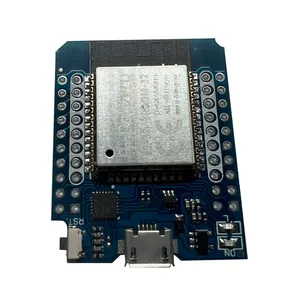
For anyone trying to upgrade their Zombie WiFi from ESP8266 to ESP32 and unsure how to do here is the numpty's guide for people like me.
First order the ESP32's that Tom linked to.
https://s.click.aliexpress.com/e/_c3QjPOaj
If this link fails then search for Wemos D1 Mini ESP32. There are some variations and I've tried two types but as far as I can tell the only difference is the USB chip. If you use Linux it won't matter but Windoze will probably not be so intelligent.
It should look something like this
When you have your ESP32, download the firmware from Tom's github by clicking on the Green CODE button and download the zip file
https://github.com/Tom-evnut/esp32-web- ... tx_rx_swap
When you unzip it you should see esp32-web-interface_uart_rx_tx_swap-0x000.bin
This is the file you will use next.
Now open the web page
https://esptool.spacehuhn.com/
Connect the ESP32 to USB and click Connect
Select the correct USB port and you should see it connecting to the ESP32
Click on Add and select your bin file. I deleted the previous links that were on the page but you may not need to.
Enter three 0's to mirror Tom's setting and click Program
You should see the percentage flashing in the box below.
Note it takes a few minutes and Jamie found it can fail if you switch tabs.
When it is finished reset the ESP32 by powering off and on then connect to the WiFi (ESP_XXXXXX) and go to web page 192.168.4.1
Note, it may not work well with a phone so use a laptop instead. If you want to use a phone ensure 4G or 5G mobile data is turned off.
You may need to get suitable headers as well since the ESP32 I got had the wrong type
These should be OK
https://s.click.aliexpress.com/e/_c4EgsHkb
Solder them to the pins marked in white and once you're happy the web interface is working bung it into yer Zombie.