Page 1 of 1
HOWTO: ESP32 Drop in replacement boards
Posted: Fri Mar 13, 2026 4:54 pm
by tom91
Following issues with the ESP8266 and it starting to run out of horsepower specially on Zombie due to the large param sets.
Hardware
Wemos ESP8266 pin compatible Wemos ESP32
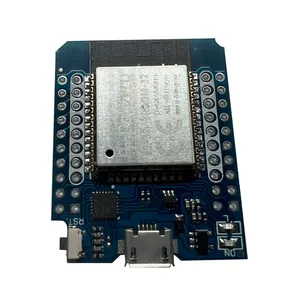 https://www.aliexpress.com/item/1005006026692511.html
https://www.espboards.dev/esp32/d1-mini32/
Software
https://www.aliexpress.com/item/1005006026692511.html
https://www.espboards.dev/esp32/d1-mini32/
Software
https://github.com/Tom-evnut/esp32-web- ... tx_rx_swap
Flashing can be done via Platform IO :
https://github.com/Tom-evnut/esp32-web- ... g_esp32.md
Flashing via web based flasher
Bin file to be flashed starting address 0x000 :
https://github.com/Tom-evnut/esp32-web- ... -0x000.bin
Web based ESP32 flasher:
https://esptool.spacehuhn.com/
In development
Single click web browser based installer.
Re: HOWTO: ESP32 Drop in replacement boards
Posted: Tue Mar 24, 2026 5:31 pm
by Bigpie
Just tested on a fresh from the packet board, worked well, one thing to note, if you navigate to another tab while it's flashing, it may fail. Mine failed a few times unless I kept the tab focused.
Re: HOWTO: ESP32 Drop in replacement boards
Posted: Wed Mar 25, 2026 2:31 pm
by Alibro
EDIT: Ignore this, I should know better than to try to use a phone to connect to a local WiFi.
I've used a laptop and it is working as expected so now I will plug it into the Zombie and see if it works.
I've bought a few of the boards linked by Tom and had a go at installing the firmware but having issues.
I used the ESP Web Tool to upload the bin file in Tom's Github but it doesn't seem to do anything after completion. I reboot the ESP32 and can see it as a WIFI in my phone but there is no web page at 192.168.4.1.
Have I misunderstood what is going on here
Has it failed
Or is there something else I need to do?
This is what I see when I go to install the firmware on the website and after I click on Program it seems to install OK.
Re: HOWTO: ESP32 Drop in replacement boards
Posted: Wed Mar 25, 2026 3:12 pm
by Bigpie
Phones can be funny with APs that have no internet connection. It helps to turn off mobile data when connecting to these esp32s
Re: HOWTO: ESP32 Drop in replacement boards
Posted: Wed Mar 25, 2026 3:21 pm
by Alibro
Yip, I really am a numpty, the phone messing about cost me a couple of hours.
ESP32 installed and working a treat. I was hoping this would stop the communication issues and so far so good.
Re: HOWTO: ESP32 Drop in replacement boards
Posted: Wed Mar 25, 2026 4:52 pm
by Alibro
For anyone trying to upgrade their Zombie WiFi from ESP8266 to ESP32 and unsure how to do here is the numpty's guide for people like me.
First order the ESP32's that Tom linked to.
https://s.click.aliexpress.com/e/_c3QjPOaj
If this link fails then search for Wemos D1 Mini ESP32. There are some variations and I've tried two types but as far as I can tell the only difference is the USB chip. If you use Linux it won't matter but Windoze will probably not be so intelligent.
It should look something like this
When you have your ESP32, download the firmware from Tom's github by clicking on the Green CODE button and download the zip file
https://github.com/Tom-evnut/esp32-web- ... tx_rx_swap
When you unzip it you should see esp32-web-interface_uart_rx_tx_swap-0x000.bin
This is the file you will use next.
Now open the web page
https://esptool.spacehuhn.com/
Connect the ESP32 to USB and click Connect
Select the correct USB port and you should see it connecting to the ESP32
Click on Add and select your bin file. I deleted the previous links that were on the page but you may not need to.
Enter three 0's to mirror Tom's setting and click Program
You should see the percentage flashing in the box below.
Note it takes a few minutes and Jamie found it can fail if you switch tabs.
When it is finished reset the ESP32 by powering off and on then connect to the WiFi (ESP_XXXXXX) and go to web page 192.168.4.1
Note, it may not work well with a phone so use a laptop instead. If you want to use a phone ensure 4G or 5G mobile data is turned off.
You may need to get suitable headers as well since the ESP32 I got had the wrong type
These should be OK
https://s.click.aliexpress.com/e/_c4EgsHkb
Solder them to the pins marked in white and once you're happy the web interface is working bung it into yer Zombie.
Re: HOWTO: ESP32 Drop in replacement boards
Posted: Fri Apr 10, 2026 9:02 am
by Alibro
I've been using the ESP32 in my Zombie for a couple of weeks and so far so good.
I haven't seen any communication errors since installing it and before they were frequent so I'd say this is a very worthwhile upgrade.
Re: HOWTO: ESP32 Drop in replacement boards
Posted: Fri Apr 10, 2026 9:10 am
by tom91
Few notes:
1. Best to use the ESP32 with CH9102 as this one just works out of the box. The other variant from the link does not work directly.
2. If you are doing development or upgrading the firmware on your OI device (like zombie) and do not get the expected firmware version or expected changes in parameter info - DELETE the .JSON files at the bottom of your file list. (left side menu towards the bottom "files")
Re: HOWTO: ESP32 Drop in replacement boards
Posted: Fri Apr 10, 2026 9:07 pm
by lewissuggy
This is great, seems to have fixed all of the ESP-STM comms issues I was having before with my zombie.
Also, I ordered the ESP32 with the CP2104 instead of the CH9102 and found it worked just fine on windows 11, drivers installed automatically. I just had to use this site
https://espressif.github.io/esptool-js/ instead to program it instead of the site Alibro suggested.
Re: HOWTO: ESP32 Drop in replacement boards
Posted: Sat Apr 11, 2026 9:39 am
by arber333
Alibro wrote: ↑Fri Apr 10, 2026 9:02 am
I've been using the ESP32 in my Zombie for a couple of weeks and so far so good.
I haven't seen any communication errors since installing it and before they were frequent so I'd say this is a very worthwhile upgrade.
Anyone tried to use this with Tesla charger gen2 or 3 board? Would the UI work as well as for OI?
Re: HOWTO: ESP32 Drop in replacement boards
Posted: Sat Apr 11, 2026 12:15 pm
by tom91
this is the OI interface, so yes any OI derived board works
Re: HOWTO: ESP32 Drop in replacement boards
Posted: Fri Apr 17, 2026 8:31 pm
by Alibro
For anyone with an earlier Zombie without the direct solder connections for the wemos ESP8266 or ESP32 this seems to be working for me.
The Olimex plugs into 10 pins marked "ESP WiFi Module" "Conn1"
Connect it as shown here, only the four pins on the RHS are used.
I used three layers of padded double sided sticky tape normally used for holding on number plates to hold the ESP32.
The board is held nicely above the components on the Zombie.
Be careful to use the inside row of pins on the ESP32 marked in white.